
Out’n About! for Windows
Simple and Convenient In/Out Status
Out’n About! for Windows 6.2 is a standalone status board software, that doesn’t require Outlook to run. It’s installed on your network and is flexible enough to fit any office configuration.
Main Screen Features
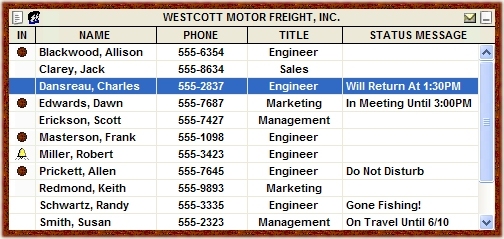
Out’n About! tracks employees from their computer terminal activity – employees automatically keep their status up to date without a reminder from the receptionist. Out’n About! always asks for status when an employee turns off their terminal!
Out’n About! allows users to be assigned to different groups within the company such as marketing, engineering, or accounting. Users can then select which group they wish to view on their board. This allows managers to easily check on their division, or for the team members to coordinate with their group. Out’n About! tracks employees from their computer terminal activity – employees automatically keep their status up to date without a reminder from the receptionist. Out’n About! always asks for status when an employee turns off their terminal!
Phone Message Pad
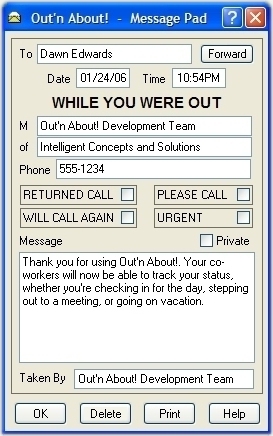
A complete phone messaging system is standard with Out’n About!. Employees can send, retrieve and store messages. Employees are notified when a new message is received by a flashing message indicator on the top right-hand corner of the board or an optional popup alert.
You no longer need a message pad or a separate messaging program. When you receive a call for another employee, you can quickly check their availability using the board, and then move right to the Message Pad – saving time and eliminating the chance of lost message slips.
Out’n About! allows users to send a message to an individual user, or to broadcast messages to mutiple users, a group, or all users in the company. Messages can also be flagged as private. Private messages can only be read by the recipient(s) of the message.
Start your free trial of Out’n About!
Quickly learn the most popular features of Out’n About! For Outlook.
Check In Notification
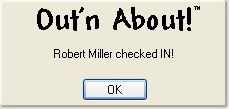
The check in notification option in Out’n About! allows an employee to request an alert when another employee checks in.
This eliminates the need to constantly check the status board when you need to speak to another employee as soon as they are available.
USER SETTINGS
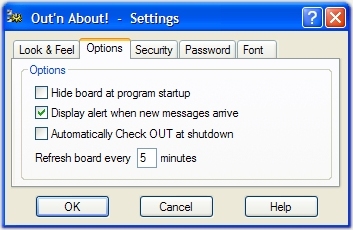
User settings available include: customizing the board frame, enabling message notification, hiding the board at startup, changing your password, and indicating the desired board refresh rate.
STATUS MESSAGE UPDATING
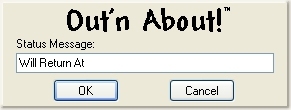
Employees can perform a status message update when they leave the desk for any reason, such as lunch or a meeting. There’s no guesswork to return times – employees input their exact return information in the status message area upon leaving their desk. This feature can also be used to indicate when you are in the office but are not available or do not want to be disturbed.
REPORTS
Out’n About! administrative and receptionist users can view and print Employee, Status History, and Message History reports using their HTML Web Browser.
